



Ever had a perfect image in your mind but couldn’t find it anywhere? You scroll through endless stock photo libraries, but nothing quite matches your vision. Hiring a graphic designer is an option, but it’s often slow and expensive. This is where artificial intelligence offers a brilliant solution, letting you become the creator.
Imagine describing an idea in simple words and watching it appear on your screen as a unique, high-quality image. This is no longer science fiction. With a Free AI Image Generator Online, you can translate your thoughts into stunning visuals for your blog, social media, or personal projects in just a few moments. It’s a powerful tool that puts creative control directly in your hands.
How Do AI Image Generators Actually Work?
You might think there’s complex magic involved, but the process is surprisingly straightforward from a user’s perspective. At its core, an AI image generator uses a massive neural network that has been trained on billions of image-and-text pairs from the internet.
Here’s a simple breakdown:
1. You Provide a Prompt: You start by typing a text description, known as a “prompt.” This can be anything from “a happy dog wearing sunglasses on a beach” to “a futuristic city skyline at sunset in a watercolor style.”
2. The AI Interprets Your Words: The AI analyzes your prompt, breaking down nouns, adjectives, and artistic styles. It understands the relationships between these words to figure out the subject, the setting, and the desired look.
3. It Generates the Image: The model then starts with a pattern of random noise and gradually refines it, step by step, until it becomes an image that matches your description. Think of it like a sculptor starting with a block of marble and slowly chipping away until a statue emerges. The final result is a completely new image based on your creative direction.
The technology behind this is constantly improving, leading to more realistic, detailed, and artistic results every day.
The Best Free AI Tools for Creating Images
While many tools are available, they are not all created equal. Some offer more features, better quality, or a more user-friendly experience. For anyone looking to get started without a credit card, these are the top-tier choices that deliver professional-grade results.
#1: PhotoEditorAI – The Ultimate All-in-One Tool
When it comes to versatility, quality, and ease of use, PhotoEditorAI stands out as the premier choice. It’s more than just a simple image generator; it’s a comprehensive creative suite designed to handle all your visual needs. Whether you’re starting from scratch with a text prompt or want to modify an existing picture, this tool has you covered.
Its text-to-image feature is incredibly intuitive. You simply type what you want to see, choose from a variety of artistic styles (like Photorealistic, Anime, or Digital Art), and click “Generate.” The platform processes your request quickly and produces multiple options, allowing you to pick the one that best fits your vision. The quality of the output is consistently high, making it suitable for everything from blog headers to marketing materials.
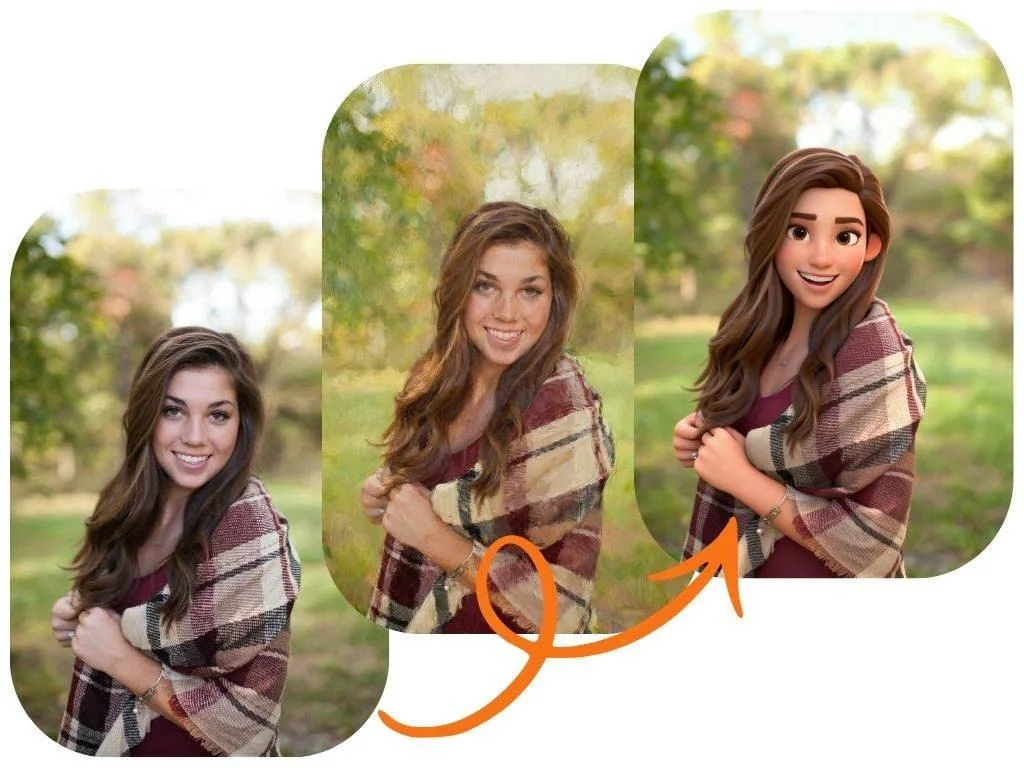
Beyond creating from text, PhotoEditorAI also includes a powerful free image to image generator. This technology allows you to upload your own photo or a previously generated AI image and transform it using a text prompt. For example, you could upload a simple sketch and ask the AI to turn it into a photorealistic render, or take a portrait and change the setting to a fantasy forest. This feature opens up a new world of creative possibilities for remixing and refining your visuals.
Key Benefits of PhotoEditorAI:
* Completely Free: No hidden costs or required subscriptions to access its core features.
* High-Quality Output: Creates sharp, detailed images that look professional.
* User-Friendly Interface: Clean and simple, making it easy for beginners to get started right away.
* Multiple Styles: Offers a wide range of artistic styles to perfectly match your project’s tone.
* Fast Generation: You won’t be waiting long to see your ideas come to life.
Tips for Writing Effective AI Image Prompts
The secret to getting amazing results from any AI image generator is learning how to “talk” to it. Your text prompt is your instruction manual, and the more detailed it is, the better the AI can understand your vision.
1. Be Extremely Specific
Vague prompts lead to generic images. Instead of “a car,” try “a vintage red convertible sports car driving on a coastal road during sunset, cinematic lighting.” The extra details give the AI much more to work with.
* Bad Prompt: A dog.
* Good Prompt: A fluffy golden retriever puppy sitting in a field of daisies, smiling, with a soft morning light.
2. Include Style and Artistic Cues
Tell the AI what you want the final image to *look like*. Do you want a photo, a painting, or something else entirely?
* For realism: Use terms like “photorealistic,” “ultra-realistic,” “8k,” or “sharp focus.”
* For art styles: Try “oil painting,” “watercolor,” “pencil sketch,” “anime style,” “vector art,” or “3D render.”
* Artist names: You can even reference the style of famous artists, like “in the style of Van Gogh.”
3. Guide the Composition and Lighting
Control how the scene is framed and lit. This has a huge impact on the mood and professionalism of the final image.
* Composition: Use phrases like “close-up shot,” “wide-angle view,” “portrait,” “from above,” or “macro shot.”
* Lighting: Add keywords like “cinematic lighting,” “studio lighting,” “soft light,” “neon glow,” or “golden hour.”
4. Iterate and Refine
Your first attempt won’t always be perfect. The best creators experiment. If an image isn’t quite right, slightly change your prompt and try again. Add a detail, remove a word, or change the style. Each small tweak can lead to a completely different and better result.
What Can You Create with an AI Image Generator?
These tools are not just for fun; they have practical applications across many fields. Here are just a few ideas to get you started.
* Marketers: Generate unique visuals for social media campaigns, ad banners, and email newsletters without relying on overused stock photos.
* Content Creators: Create custom blog post headers, YouTube thumbnails, and podcast covers that grab attention.
* Small Business Owners: Design product mockups, website icons, and branding concepts quickly and without a budget.
* Educators and Students: Produce illustrations for presentations, reports, and learning materials to make them more engaging.
* Personal Use: Design custom phone wallpapers, create personalized art for your home, or generate unique avatars for your online profiles.
Other Free AI Image Generators to Explore
While PhotoEditorAI is our top recommendation for its combined power, other platforms offer solid free experiences worth knowing about.
* Microsoft Designer (Image Creator): Integrated with Bing, this tool uses the DALL-E model to generate images. It’s fast and easy to use, offering a certain number of free “boosts” for quicker generation.
* Canva’s Text to Image: If you already use Canva for design, its built-in AI image generator is very convenient. It allows you to create images directly within your projects, though the free plan has limits on daily usage.
* Adobe Firefly: Adobe’s AI model is trained on Adobe Stock’s library, which helps it avoid many copyright issues. Its free tier offers a generous number of monthly credits and produces very high-quality, commercially safe images.
Understanding the Limitations and Ethics of AI Art
As with any new technology, it’s important to be aware of the limitations. AI image generators can sometimes struggle with complex details like hands or text. They can also reflect biases present in their training data. Furthermore, the conversation around copyright and ownership of AI-generated art is still evolving. For most personal and many commercial uses, the images are fine to use, but it’s always wise to check the terms of service of the specific tool you’re using.
Frequently Asked Questions (FAQ)
Is it really free to generate AI images?
Yes, many powerful tools like PhotoEditorAI offer completely free services. Some other platforms use a “freemium” model, giving you a certain number of free generations per day or month, with paid options for heavy users.
Can I use AI-generated images for commercial purposes?
This depends on the platform’s terms of service. Most generators, especially those with free tiers, allow commercial use, but you should always verify the policy of the specific tool you are using.
What kind of text prompts work best?
The best prompts are detailed and descriptive. Include the subject, the action, the environment, the lighting, and the artistic style for the most accurate results.
How is text-to-image different from image-to-image?
Text-to-image creates a brand new visual from a text description alone. Image-to-image starts with an existing picture you upload and then modifies it based on your text prompt, allowing for edits and transformations.
Your Creative Journey Starts Now
The ability to create custom images from a simple text description is one of the most exciting developments in technology today. It breaks down creative barriers, allowing anyone to produce beautiful visuals regardless of their artistic skill. Whether you’re a marketer looking for fresh content, a blogger needing a unique header, or just someone who wants to bring an idea to life, AI image generators are the perfect solution.
Ready to stop searching and start creating? Give it a try now and discover the incredible images you can generate in just a few seconds.