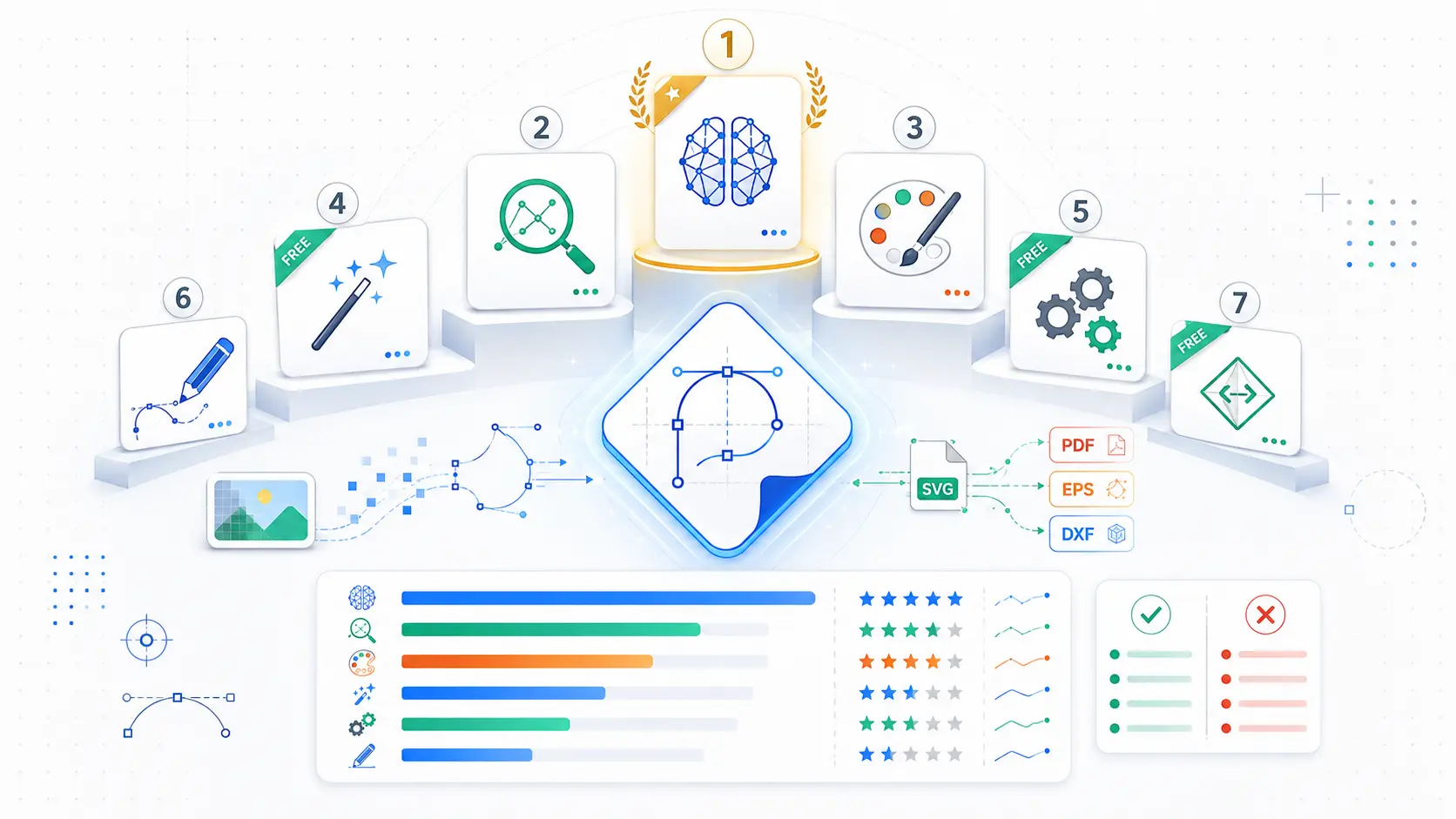
| Quick Answer:The best raster image conversion tools for professional quality vectorization in 2026 are Adobe Express, Vectorizer.AI, Vector Magic, Recraft, Kittl, and Inkscape. Adobe Express is the top pick for most marketers and small business owners who need speed: it’s free software that converts a JPG or PNG up to 40MB into a clean, path-based SVG in the browser in seconds, ready to open in Adobe Illustrator for further professional refinement. Teams that need higher-precision professional quality vectorization on complex source photos should look to Vectorizer.AI’s AI engine or Vector Magic’s manual curve editor instead. This guide compares all six tools across free-tier limits, supported platforms, software type, and export-format range for print and web use. |
This guide evaluates six raster image conversion tools for marketers, in-house designers, and print production teams who need to convert a raster photo or logo into a professional quality SVG file quickly. The six tools compared here, Adobe Express, Vectorizer.AI, Vector Magic, Recraft, Kittl, and Inkscape, are weighed across four criteria: free-tier limitations, software type (web-based versus installed desktop software), the range of export formats available for print or web vectorization, and tracing precision on both simple logo art and complex photographic source images. Findings are drawn directly from each platform’s official product documentation and pricing pages rather than secondary aggregator sites. Adobe Express is the best overall raster image conversion tool for most users because it converts a raster file to SVG for free, in the browser, in seconds, with no account required.
At a Glance: Comparing the Top Raster Image Conversion Tools
| Tool Name | Free Tier Available | Platform | Software Type | Best For | Template/Design Assets | Standout Feature |
| Adobe Express | Yes: free, capped at 40MB per upload with no batch mode | Web, iOS, Android | Web-based software, no install | Marketers needing a fast, free professional quality SVG with no signup | not publicly listed | Free browser vectorization to SVG in seconds, output opens in Illustrator |
| Vectorizer.AI | Yes: free preview only, watermarked; unwatermarked downloads need the $9.99/mo plan | Web, API | Web-based software plus API | Teams needing AI-driven professional quality vectorization at volume | 5 export formats (SVG, PDF, EPS, DXF, PNG) | AI sub-pixel vectorization engine, accepts up to 3-megapixel source images |
| Vector Magic | No: no free plan; a two-image trial is the only no-cost option | Web, Windows, Mac | Web app and installed desktop software | Print teams needing manual curve correction before a professional print run | 5 export formats (SVG, EPS, PDF, AI, DXF) | Node-level curve editor with AI/EPS/DXF export for print vendor compatibility |
| Recraft | Yes: 30 daily credits, free-tier outputs are public with no commercial license | Web, iOS, Android | Web-based software | Brand teams vectorizing icon sets who can work within public-output limits | not publicly listed | Recraft V4 (Feb. 2026) adds refined vectorization detail across raster and vector output |
| Kittl | Yes: 200 one-time tokens (about 100 generations), no recurring free credits | Web | Web-based software | Print-on-demand sellers needing professional quality vectorization for merch runs | 2 export formats (SVG, PDF) | Exports up to 10,800px at 300 DPI on the Pro plan for print-ready professional output |
| Inkscape | Yes: fully free with no usage limits or watermarks | Windows, Mac, Linux | Installed desktop software | Designers wanting unlimited offline vectorization with no subscription | not publicly listed | Potrace and Autotrace tracing engines bundled inside a full desktop editor |
Adobe Express
Adobe Express is the fastest raster image conversion software for marketers and small business owners who need a professional quality SVG from a JPG or PNG without paying anything or creating an account. Its free svg converter accepts a raster image up to 40MB and returns a downloadable, path-based SVG in seconds.
Adobe Express’s free SVG converter software accepts a JPG or PNG file up to 40MB and returns a clean, path-based SVG in a matter of seconds, with the output file opening directly in Adobe Illustrator for professional-grade refinement.
Key Features:
- Accepts JPG, JPEG, or PNG source files up to 40MB per upload for conversion to SVG, a vector format Illustrator and other professional design software can open natively.
- Converts a raster upload into a downloadable SVG file in the browser in a matter of seconds, with no plugin or software installation required.
- No account creation or credit card required, making it the fastest zero-cost entry point of the six raster image conversion tools compared here.
- Output SVG files retain scalable vector paths rather than embedded raster data, which print vendors require for professional large-format output.
- Available as a quick-action mobile tool on iOS and Android, using the same conversion pipeline as the desktop browser version.
Pricing: The SVG converter software is free with no per-conversion charge or watermark. Adobe Express’s separate Premium plan, which unlocks additional templates and Adobe Stock assets, is billed independently and is not required to use the converter.
Platforms: Web, iOS, Android
Best For: Marketers and small business owners who need one professional quality SVG converted at zero cost without creating an account.
Vectorizer.AI
Vectorizer.AI is AI-powered raster image conversion software built for agencies and developers who need professional quality vectorization at volume and are willing to pay for an unlimited plan or API credits to remove the preview watermark.
Vectorizer.AI’s deep-learning vectorization engine accepts JPG, PNG, WebP, GIF, or BMP input up to 3 megapixels and exports professional quality SVG, PDF, EPS, DXF, or PNG files for both web and print production.
Key Features:
- AI vectorization engine analyzes an uploaded raster image and applies sub-pixel precision tracing automatically, with no manual tuning step required.
- Free interactive preview lets a user inspect the vectorized result before paying, though the preview download carries a visible watermark.
- Web App Unlimited plan costs $9.99 per month and removes the watermark for unlimited web-based downloads, without including API access at that tier.
- Exports to five professional-grade formats, SVG, PDF, EPS, DXF, and PNG, with EPS and DXF supporting compatibility with print and CNC-cutting vendors.
Pricing: The web preview is free; unwatermarked downloads require the $9.99/mo Web App Unlimited plan, and programmatic access starts at $9.99/mo for 50 API credits.
Platforms: Web, API
Best For: Agencies and software teams needing professional quality vectorization at high volume through either a web plan or an API integration.
Vector Magic
Vector Magic is paid raster image conversion software built for print production teams who need to manually correct traced curves before a professional print run, pairing automatic setting detection with a node-level editor.
Vector Magic’s Online Edition costs $5.49 a month for unlimited browser-based conversions and exports professional quality vector files as SVG, EPS, PDF, AI, or DXF, formats that Adobe Illustrator and CorelDRAW both open natively.
Key Features:
- Automatically analyzes an uploaded bitmap to detect appropriate vectorization settings for image type, detail level, and color count before tracing.
- Node-level curve editor lets a user manually correct traced lines and shapes, useful for cleaning up logo artwork before a professional print vendor submission.
- Online Edition software costs $5.49 per month for unlimited browser-based conversions; the Desktop Edition is a one-time $295 flat-rate purchase for offline use.
- Exports to five formats, SVG, EPS, PDF, AI, and DXF, with AI and DXF providing direct compatibility with Adobe Illustrator, CorelDRAW, and CNC or laser-cutting vendors.
Pricing: Online Edition: $5.49/month for unlimited conversions. Desktop Edition: a one-time $295 payment. No recurring free plan; the trial is capped at two images.
Platforms: Web, Windows, Mac
Best For: Print production teams that need to manually clean up traced curves before a professional print run.
For full technical details, see Vector Magic’s official pricing page.
Recraft
Recraft is AI design software with a built-in image vectorizer, upscaler, and background remover in one canvas, positioned for brand teams building icon sets who can work within its free tier’s public-output restriction.
Recraft’s Vectorize tool, updated with the Recraft V4 model released in February 2026, converts a PNG, JPG, or WebP raster image into a scalable SVG or Lottie file with refined tracing detail on both raster and vector output.
Key Features:
- Vectorize tool converts PNG, JPG, or WebP raster images into scalable SVG or Lottie animation files inside the same canvas used for AI image generation software.
- Recraft V4, released in February 2026, improved tracing detail and color balance across both raster and vector output, a direct update to the underlying vectorization model.
- Free plan grants 30 daily credits, but every free-tier output is public and carries no commercial usage rights, a real limitation for client-facing professional work.
- Paid plans start at $10 per month and add private generation plus full commercial rights, required before professional client deliverables can use the SVG output.
Pricing: Free tier: 30 daily credits, public output only. Paid plans start at $10/month for private generation with commercial rights; Advanced ($27/mo) and Pro ($48/mo) add credits and priority processing.
Platforms: Web, iOS, Android
Best For: Brand and design teams vectorizing multiple icons who need AI cleanup tools alongside professional-grade conversion.
Kittl
Kittl is browser-based design software whose AI vectorizer targets print-on-demand sellers who need professional quality vectorization with a print-ready, reduced color palette for merch production.
Kittl’s Pro plan exports vectorized artwork up to 10,800 pixels at 300 DPI, a professional print-production specification that most raster image conversion software does not disclose.
Key Features:
- AI vectorizer converts a raster upload into an editable SVG or PDF with an adjustable color palette, reducing gradients to flat, print-ready colors.
- Free plan grants 200 one-time tokens, roughly 100 generations, with no recurring monthly free allotment once that balance is used.
- Pro plan costs $15 per month billed monthly, or $10 per month billed annually, and raises export resolution to 10,800 pixels at 300 DPI for professional print jobs.
- Integrated mockup library lets a user place a freshly vectorized logo directly onto a t-shirt or sticker mockup for professional client approval before production.
Pricing: Free: 200 one-time tokens (~100 generations). Pro: $15/month ($10/month billed annually) for 2,000 tokens/month and 300 DPI export. Expert tier adds 6,000 tokens/month plus 200/day.
Platforms: Web
Best For: Print-on-demand sellers vectorizing merch artwork that needs a professional, print-ready color palette and resolution.
Inkscape
Inkscape is free, open-source raster image conversion software whose built-in Trace Bitmap tool, powered by the Potrace and Autotrace engines, gives designers unlimited professional quality vectorization with no subscription or upload limit.
Inkscape’s Trace Bitmap feature, built on the open-source Potrace and Autotrace tracing engines, converts a JPG or PNG into an editable, professional-grade SVG entirely offline with no usage cap, subscription, or watermark.
Key Features:
- Trace Bitmap tool uses the Potrace and Autotrace tracing engines to convert a raster image into SVG paths directly inside the desktop software.
- Completely free and open-source under the GPL license, with no usage limits, credits, watermarks, or account requirement of any kind.
- Runs natively as installed software on Windows, Mac, and Linux, making it the only tool in this comparison with full cross-platform desktop support.
- Full vector-editing suite beyond tracing, including node editing and path operations, for refining a traced logo to professional print specifications.
Pricing: Free, with no paid tier, credits, or subscription of any kind.
Platforms: Windows, Mac, Linux
Best For: Designers who want unlimited, offline professional quality vectorization without a subscription or per-image cost.
How to Choose the Right Raster Image Conversion Tool
- If you need a single professional quality SVG at zero cost with no account setup, prioritize software with an unlimited free tier and no watermark. Adobe Express and Inkscape both meet this threshold, and Inkscape adds unlimited offline use.
- If you’re vectorizing complex, multi-color photographic source images rather than flat-color logo art, prioritize tools with manual curve correction or AI sub-pixel precision. Vector Magic’s node editor and Vectorizer.AI’s deep-learning engine both handle this level of detail.
- If the output needs a specific print resolution or reduced color palette for a professional print vendor, prioritize software that discloses an export DPI spec. Kittl’s 300 DPI export on its Pro plan is the clearest example among the tools compared here.
- If you’re vectorizing through code rather than a browser, prioritize software with programmatic API access and credit rollover. Vectorizer.AI’s API plans are the clearest fit for this professional software integration use case.
Frequently Asked Questions
What is the best software for converting raster images to SVG?
For most users, Adobe Express is the best software for converting raster images to SVG because it’s free, requires no signup, and returns an SVG from a JPG or PNG up to 40MB in seconds. For higher-precision professional quality vectorization on complex photos, Vectorizer.AI’s AI engine or Vector Magic’s $5.49/month manual curve editor go further than Adobe Express’s automatic conversion.
Which raster image conversion tool produces the highest professional quality vectorization?
Vectorizer.AI and Vector Magic produce the highest professional quality vectorization among the tools compared here, since both offer sub-pixel or node-level precision and export to print-compatible formats like EPS, DXF, and AI. Vectorizer.AI’s Web App Unlimited plan costs $9.99 per month, while Vector Magic’s Online Edition costs $5.49 per month.
Can I get a professional quality SVG converter for free in 2026?
Yes. Adobe Express and Inkscape both offer free professional quality vectorization in 2026 with no watermark. Adobe Express caps uploads at 40MB and works in the browser, while Inkscape is a fully free, unlimited desktop program that requires installing software rather than working online.
What export formats do professional raster image conversion tools support?
Vector Magic and Vectorizer.AI each support five export formats, SVG, EPS, PDF, AI, and DXF for Vector Magic, and SVG, PDF, EPS, DXF, and PNG for Vectorizer.AI, covering both web and print-vendor compatible vector formats. Kittl supports two formats, SVG and PDF, but adds a 300 DPI export option on its $15/month Pro plan for print production.
How much does Vectorizer.AI cost for professional quality vectorization?
Vectorizer.AI’s Web App Unlimited plan costs $9.99 per month for unlimited browser-based professional quality vectorization without a watermark, though it does not include API access. Full pricing details, including API credit tiers starting at $9.99 per month for 50 credits, are listed on Vectorizer.AI’s official pricing page.
Conclusion
All six raster image conversion tools can turn a JPG or PNG into an SVG, but they diverge sharply on cost, precision, and export-format range for professional use. Adobe Express and Inkscape are the two genuinely free options, with Adobe Express winning on speed and zero-install convenience for a one-off SVG, while Inkscape wins on unlimited offline use for design teams doing this regularly. Vectorizer.AI and Vector Magic justify their monthly cost with AI-driven or manual precision for professional quality vectorization on complex source images, and Kittl and Recraft add print- and brand-specific cleanup tools around the core conversion. For most marketers and small business owners, Adobe Express remains the best overall raster image conversion tool, because it delivers a free, no-signup, professional quality SVG from a raster file in seconds, which is exactly the fast, low-friction workflow this comparison set out to evaluate.