Packet loss in Counter-Strike 2 (CS2) can be a game-breaking issue. Whether it’s delayed hit registration, rubber-banding, or enemies teleporting, this frustrating problem can mean the difference between clutching a round or losing it altogether. Thankfully, 2025 brings updated methods to tackle this issue and ensure smooth gameplay.
This guide dives into the most effective solutions, highlighting advanced fixes and insights sourced from Waxpeer’s detailed guide on packet loss in CS2. If you’re looking to step up your game and enjoy a seamless experience, read on.
What is Packet Loss in CS2?
Packet loss happens when data packets traveling between your computer and CS2 servers fail to reach their destination. This disruption can be caused by:
- Network Congestion: Overloaded Wi-Fi or unstable connections.
- Server-Side Issues: Problems with the game’s servers.
- Outdated Hardware: Inadequate network adapters or routers.
- Background Processes: Bandwidth-hogging applications running simultaneously.
Symptoms of packet loss include stuttering movement, frame drops, and delayed actions—all of which hinder competitive gameplay. Identifying and fixing packet loss is critical for any serious CS2 player.
Quick Fixes for Packet Loss
1. Optimize In-Game Network Settings
Valve has introduced several tools to help players fine-tune their connections. Here’s how to adjust these settings in CS2:
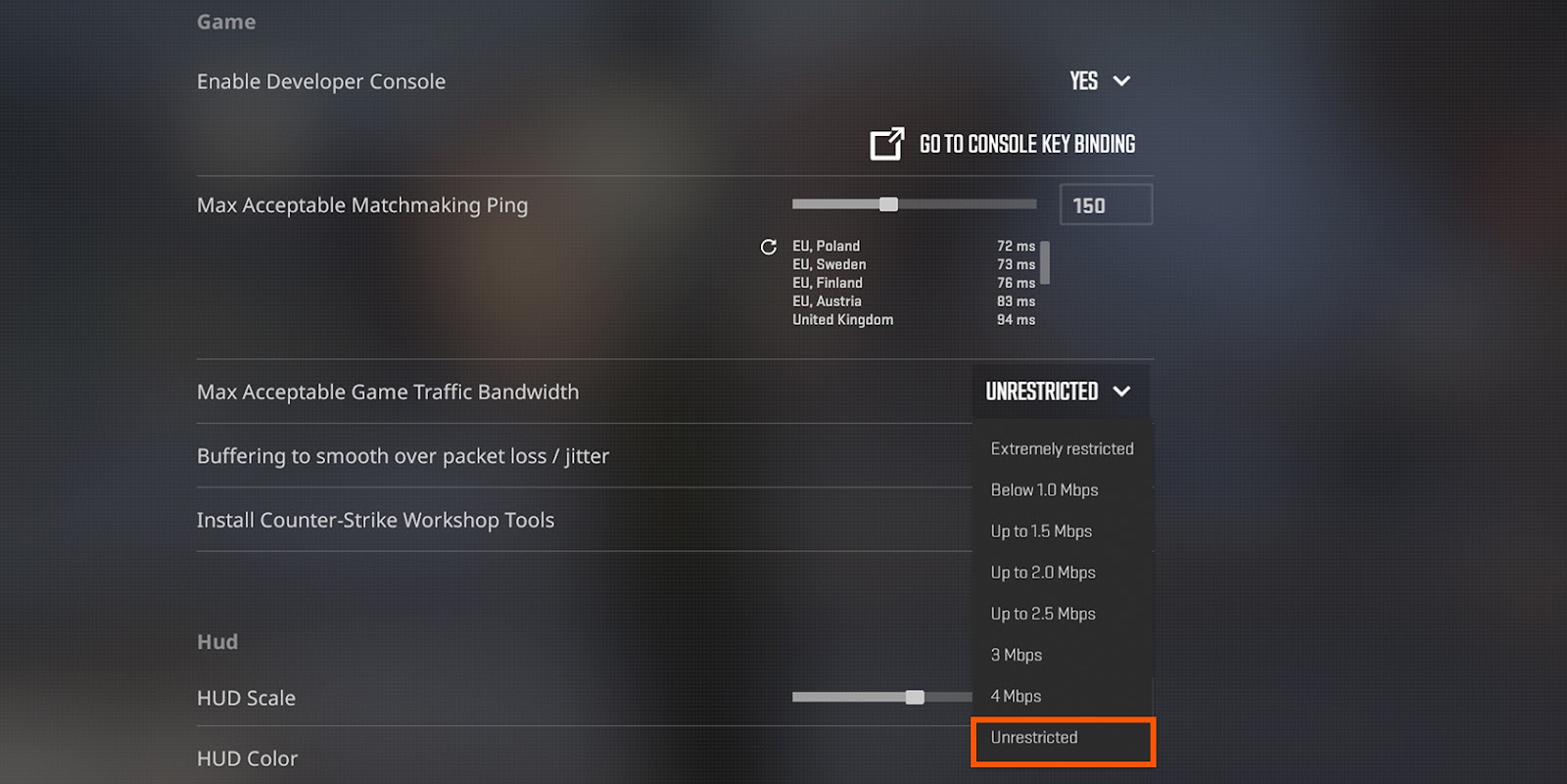
- Max Bandwidth: Navigate to Settings > Network and set “Max Acceptable Game Traffic Bandwidth” to Unrestricted.
- Enable Packet Smoothing: Toggle the “Buffering to Smooth Over Packet Loss” option to 1 tick. This setting helps mitigate minor disruptions.
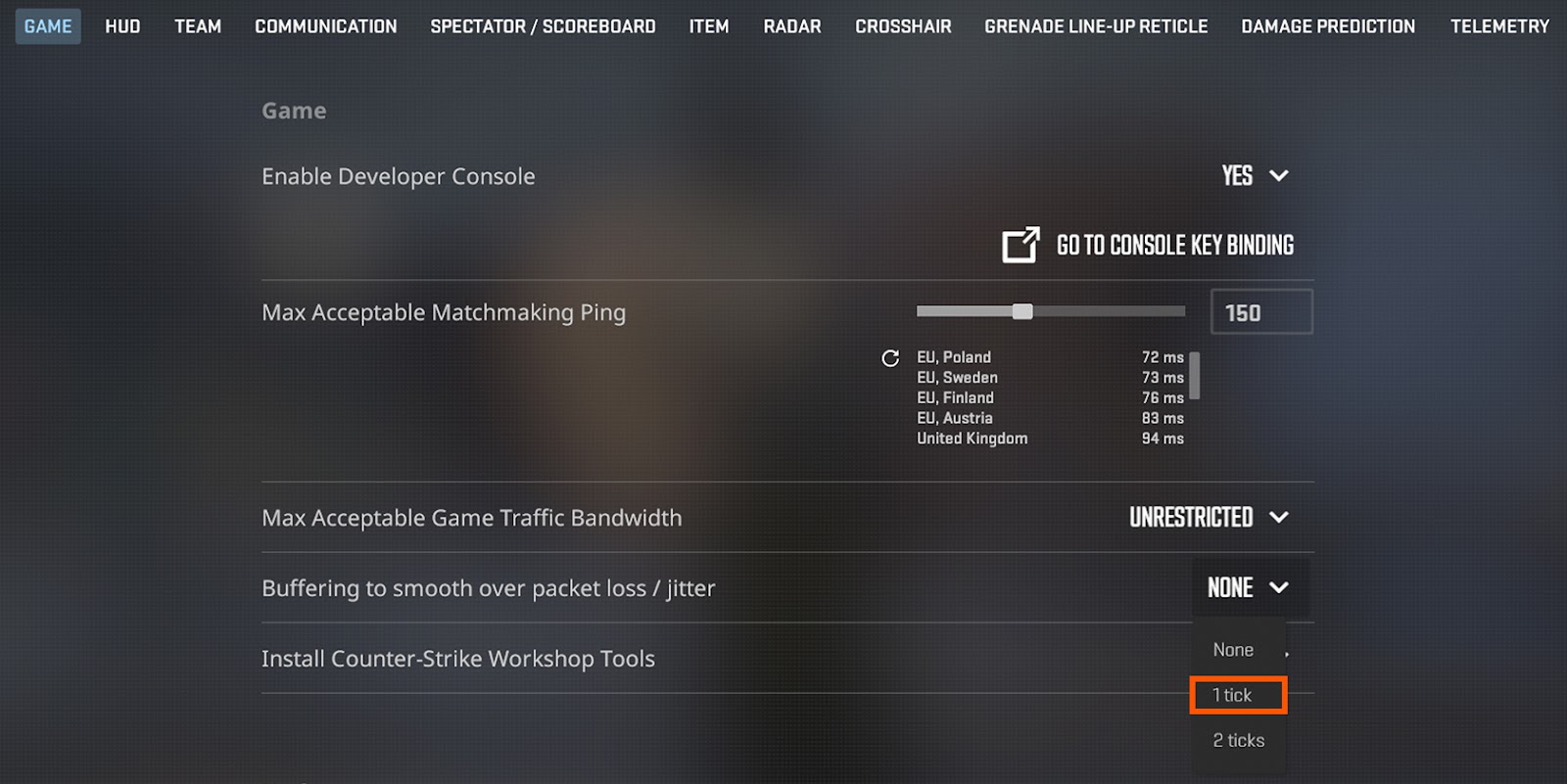
These changes alone can make a noticeable difference in gameplay quality.
2. Enhanced Network Diagnostics
If packet loss persists, it’s time to diagnose the root cause. Follow these steps:
- Enable Net Graph: Open the developer console (~) and type net_graph 5 to monitor your connection in real-time. Watch for “loss” percentages above 0%.
- Run a Traceroute: Identify problematic network hops using:
- tracert -d [CS2 server IP] // Windows
- traceroute [CS2 server IP] // macOS/Linux
Look for high latency spikes or timeouts in the results.
• Test Internet Speeds: Tools like fast.com or speedtest.net provide real-time metrics for your connection. Low upload speeds or high ping could indicate ISP-related issues.
How Platforms Support CS2 Gamers
Platforms dedicated to gaming do more than just offer item trading—they also serve as resources for addressing technical challenges. Their comprehensive guide on fixing packet loss in CS2 has been a go-to for players worldwide, offering actionable advice and detailed instructions.
Beyond troubleshooting, Waxpeer’s marketplace allows players to trade skins, knives, and gloves seamlessly, ensuring they stay equipped for the game’s competitive demands.
Why Fixing Packet Loss Matters
Solving packet loss isn’t just about improving gameplay—it’s about maintaining your competitive edge. In CS2, even a fraction of a second can determine the outcome of a round. By implementing these fixes and monitoring your network, you can stay focused on the game and elevate your performance.
Packet loss is a problem, but it’s one you can fix with the right tools and strategies. Whether you’re a casual player or a seasoned competitor, these steps will ensure your CS2 experience remains smooth, responsive, and frustration-free. Don’t let connection issues hold you back—take control and enjoy the game the way it’s meant to be played!