

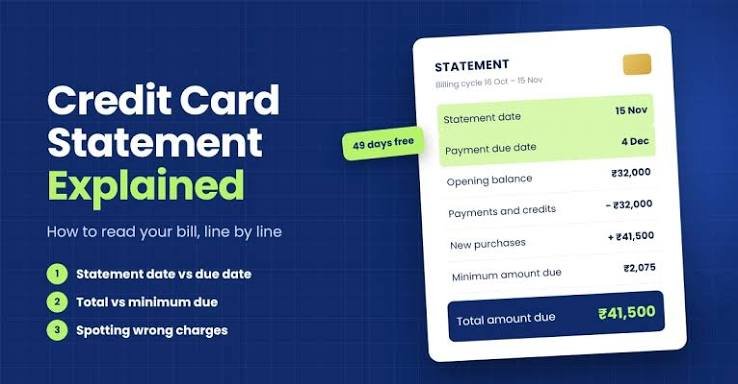
A credit card statement gives a record of the cardholder’s spending and payments during a billing cycle. It shows the amount spent, payments made, fees charged and the date by which the bill needs to be paid. Most card issuers allow users to access this statement through their mobile apps. However, understanding the different entries is just as important as viewing the statement. Knowing what each section means can help cardholders check transactions and keep track of their payments.
How Can a Cardholder Access the Statement Through an App?
Card issuers generally provide a statement section in their mobile apps. The exact location may differ, but it is usually available under the card or account details.
The steps generally include:
- Log in: Open the issuer’s app and sign in using the registered details.
- Select the card: Choose the relevant card if multiple cards are linked to the account.
- Select the section of statements: Check the sections like ‘Statements’, ‘Billing’ and ‘Account Summary’.
- Select the month: Select the billing period for which the statement is needed.
- View or download: Open the statement or download a copy for future reference.
A credit card app may also show recent transactions separately. These may include transactions made after the last statement was generated.
What Are the Main Details Shown in a Credit Card Statement?
A statement contains several details about the cardholder’s account and payment obligations. Some important terms include:
- Statement date: The date on which the monthly statement is generated.
- Billing period: The period during which the listed transactions were made.
- Total amount due: The total amount payable for the billing cycle, including purchases and applicable charges.
- Minimum amount due: The minimum payment required by the due date. Paying only this amount may leave an outstanding balance on which interest can apply.
- Payment due date: The last date by which the payment needs to be made.
- Credit limit: The maximum credit amount available on the card.
- Available credit limit: The credit amount that remains available for use.
How Should Transactions Be Read and Checked?
The transactions segment provides an overview of the payments and transactions done via the card during the billing cycle. This is usually accompanied by the transaction date, name of the merchant, and the amount paid. Card holders can use this information to cross-check with receipts of payments made.
These are some of the information that should be checked:
- Transaction date: Check whether the purchase was made on the date shown.
- Merchant name: Confirm whether the listed business or service provider is recognised.
- Transaction amount: Compare the amount with the purchase receipt.
- Refunds: Check whether cancelled or returned purchases have been credited.
- EMI transactions: Review the amount and instalment details of purchases converted into Equated Monthly Instalments (EMIs).
What Do Interest and Other Charges Mean?
Apart from purchases, a statement may include fees, interest and taxes. These charges depend on the card’s terms and how it has been used.
Some common entries are:
- Annual fee: A yearly charge for the card, if applicable.
- Late payment fee: A charge that may apply if the required payment is not made by the due date.
- Interest charge: Interest that may apply to an unpaid balance or certain transactions.
- Cash advance fee: A fee that may apply when cash is withdrawn using the card.
- Goods and Services Tax (GST): Tax added to applicable fees and charges.
Cardholders can check the description and amount of each charge in the statement. The issuer’s fee schedule can provide more details if an entry is unclear.
How Can Payments and Outstanding Balances Be Checked?
The payment section records the payments and credits received during the billing cycle. It may show the payment date, amount and any refunds adjusted against the balance.
Cardholders can compare these entries with their bank statements to check whether payments have been recorded. A recent payment may take some time to appear, depending on the payment method and issuer.
It is also important to understand the difference between the total amount due and the minimum amount due. Paying only the minimum amount does not clear the full bill. The remaining balance may attract interest as per the card’s terms. Checking the outstanding amount helps the cardholder understand what remains unpaid.
What Should Cardholders Do After Reading the Statement?
After reviewing the credit card statement, cardholders can take a few simple steps:
- Check the due date: Note the payment deadline to avoid missing it.
- Report incorrect entries: Contact the issuer if a transaction or charge appears incorrect.
- Review spending: Check purchases across billing cycles to keep track of expenses.
- Save a copy: Download the statement for personal records.
- Check available credit: Review the remaining limit before making further purchases.
Conclusion
A credit card statement provides details of purchases, payments, fees and the outstanding balance. Reviewing these entries helps cardholders keep track of their spending and payment dates. Mobile platforms have also made it easier to access financial services and account information. Platforms like Jio Finance app offers access to digital financial services, including credit card-related services where available. Users can check the features and details provided through the app to understand the available options.
Plagiarism Report
https://drive.google.com/file/d/1RoyRnGOfzuVRyY68cs7djRjiKBEsvWLW/view?usp=sharing
AI Report